
✍️ 本文更新時間:2026 年 October 18 日
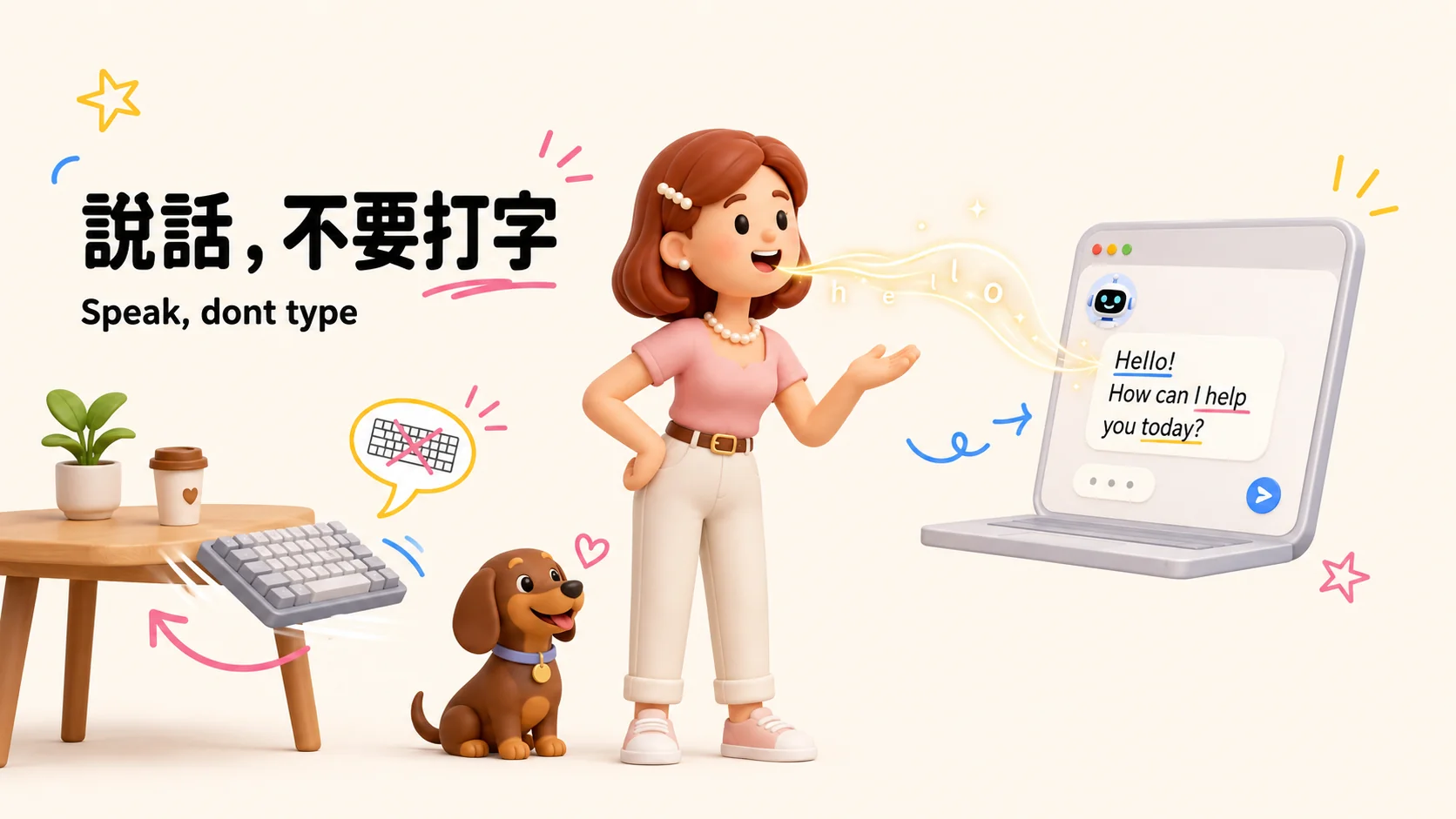
✦ AI voice input tool | The voice OS company (Palo Alto, California, USA) ✦ Free plan: 8,000 characters per week | Pro plan: approx. $12 USD/month (annual billing) ✦ Generates usable text immediately after speaking, automatically removing redundant words and completing formal punctuation ✦ Supports Traditional Chinese and mixed Chinese-English input without switching to Simplified Chinese ✦ The personal dictionary learns your proper nouns, becoming more accurate with use ✦ Supports macOS, Windows, iOS, and Android I dictated 618,000 words and saved 285 hours. Try the free version first, and upgrade if you need more!
💅 My nails are busier than my keyboard
I do nail art and apply press-on nails, so typing has never been comfortable for me. That’s why I’ve been looking for a long time for a way to replace “typing” with “speaking.”
At first, I used the built-in F5 voice input on my Mac. It was a painful experience—there were frequent typos, and I had to say punctuation marks out loud. I had to say the word “comma” to get a “,” to appear. This input method simply didn’t allow me to maintain my train of thought while speaking.
Later, I discovered Typeless, andfor the first time, I felt that “voice input” actually worked。
How much do I use voice input daily now? I checked the backend:
| Metric | Value |
|---|---|
| Cumulative Dictated Words | 618,000 words |
| Average Dictation Speed | 154 words/min(Chinese typing is about 30-40 words/min, so this is nearly 4x faster) |
| Total Dictation Time | 100 hours |
| Time Saved | 285 hours |
| Active Days | 119 days(Longest streak: 103 days) |
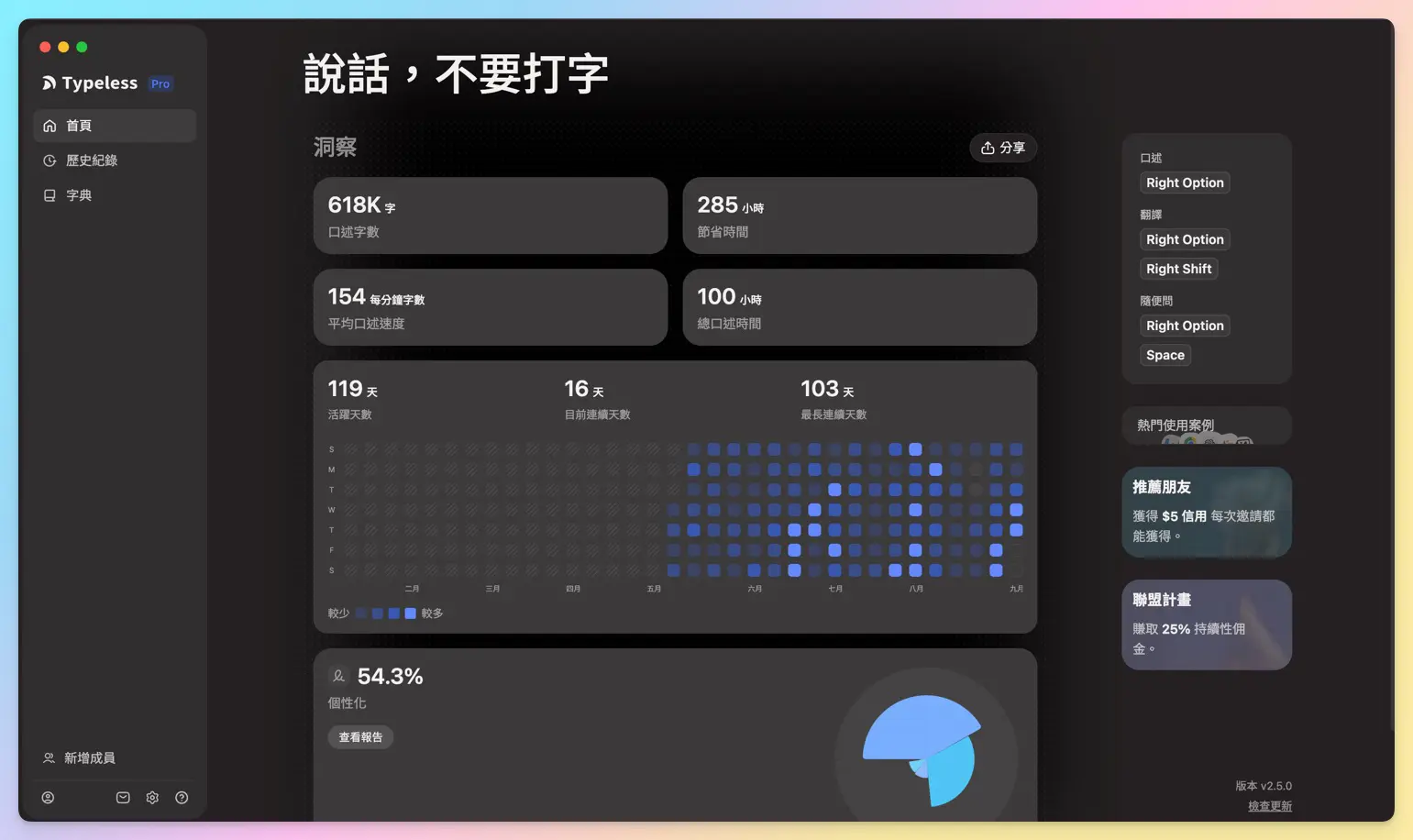
In other words: for the same amount of content, if I had typed it all out, it would have taken me roughly 385 hours; by speaking it, I only spent 100 hours, saving 285 hours, which I could have used to mentor three more cohorts of students or sleep for an entire extra month XD.
In this article, I’ll directly show you how someone who works with AI daily while running a Knowledge Management business uses Typeless, including how I integrate it into my own Second Brain system. This is a perspective I haven’t seen in any other Chinese-language Typeless reviews.

To be clear upfront: I wrote this because I use it daily and it genuinely saves me time. It’s not a paid promotion. The download link in the article is my affiliate link; using it earns me a small commission, but it doesn’t affect the price you pay or my honesty 🙌
🎙️ What is Typeless? How is it different from standard voice input?
Let’s start with the conclusion:Typeless is an AI dictation tool that "helps you organize spoken language into ready-to-use text",it is not a verbatim transcription tool。
Standard voice input (including the built-in features on Mac and iPhone) does one simple thing: it transcribes exactly what you say, including all your "ums," "uhs," and "I mean," without any changes, and you still have to dictate the punctuation yourself.
Typeless adds a layer of AI semantic processing: it removes filler words, fixes repetitions and slips of the tongue, automatically adds punctuation and sentence breaks, and even adjusts the tone based on the app you’re using (whether you’re writing an email or chatting with an AI). You press the hotkey and start speaking; when you release it, the output is already a passage that reads as if you had carefully typed it.
This difference determines who it’s suitable for and who shouldn’t use it. I’ll go into detail in the "Who is it for" section.
Development team background (credibility)
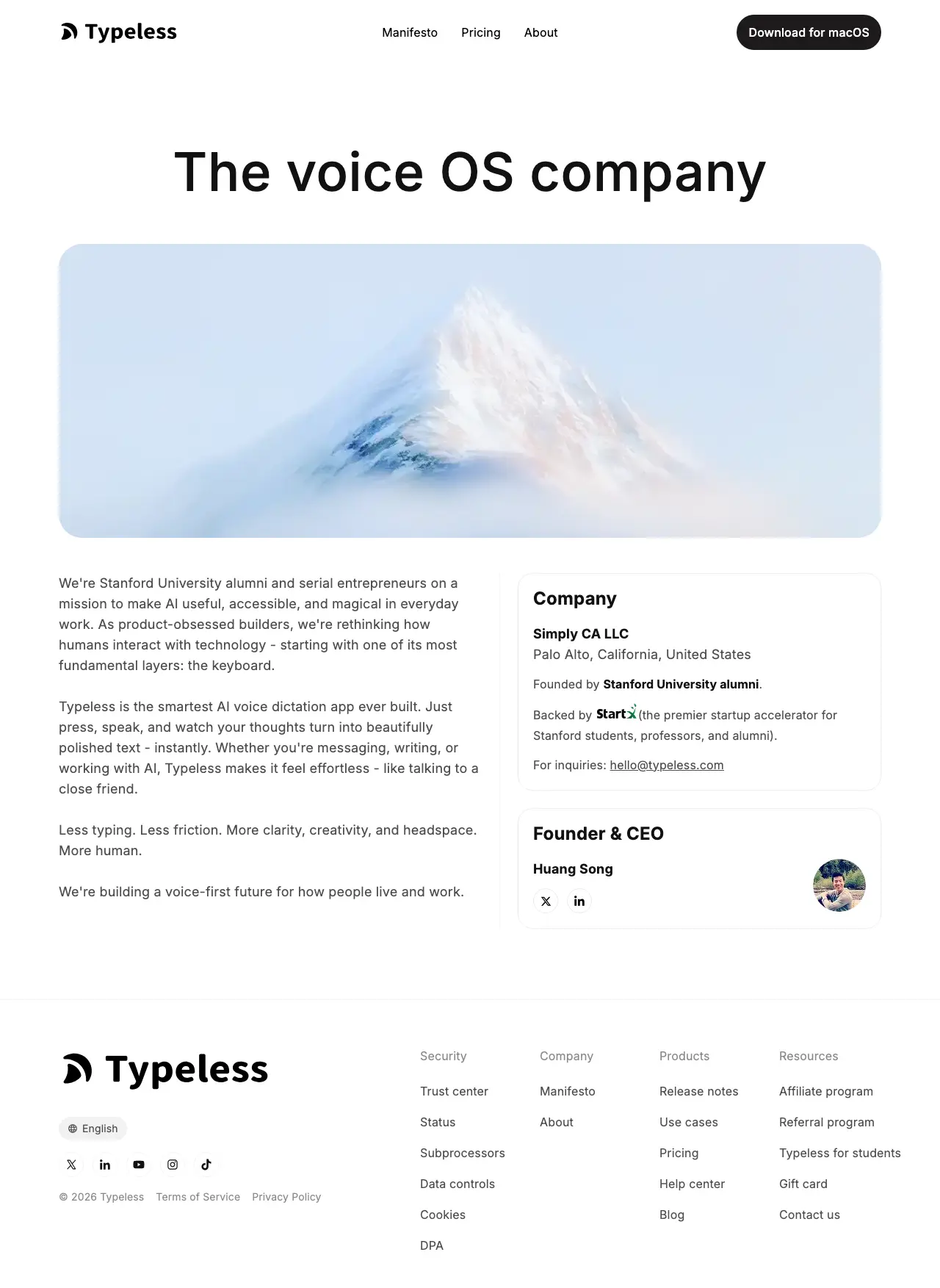
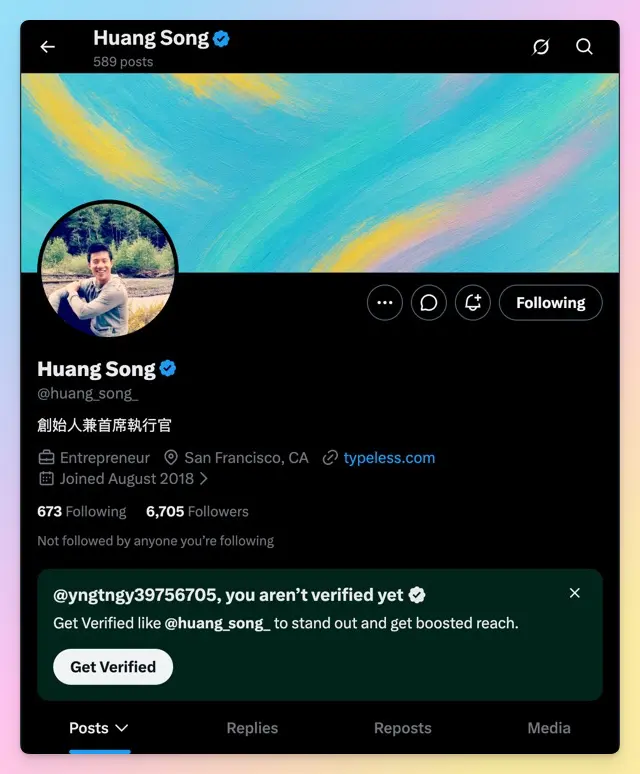
Typeless is "The voice OS company." The company is Simply CA LLC, headquartered in Palo Alto, California, USA. The founder and CEO is Huang Song,Stanford/StartX with an accelerator background, and experience as a former software engineer at Google/LinkedIn and a former hardware engineer at Apple. He was X(@huang_song_)I have a blue checkmark verification. One of my posts, where I personally appeared to discuss "the cost of mental drafts," has over 1.5 million views. This is not a product casually thrown out by an anonymous team.
⚠️ Because the founder is from mainland China, many users in Taiwan may have some concerns about the product's information security. You really need to evaluate this based on your own situation.
🧩 Core feature breakdown: These 8 things it does automatically for you
There are many articles listing Typeless's features, but most only list the names without explaining how accurate they are in real-world use. Based on my daily usage habits, I will break down the most impactful features for you.
1. Removes filler words, eliminates repetition, and adds punctuation automatically
This is the most basic layer. When speaking, it's inevitable to have filler words like "um," "uh," or "you know." Typeless automatically filters these out, and unlike built-in voice input, you don't have to say "comma" or "period" yourself.
2. Automatically adjusts tone based on the App
Typing in Notion and replying to messages on LINE naturally have different tones. Typeless adjusts the output tone based on the App you are currently using. Most competitor articles only mention this feature in passing, but my actual experience is: when chatting with AI, it tends to use direct statements that preserve the original meaning; when replying to messages, it tends to be more colloquial and concise. It's not perfect every time, but the direction is right.
3. Personal dictionary: Teach it once, and it understands forever
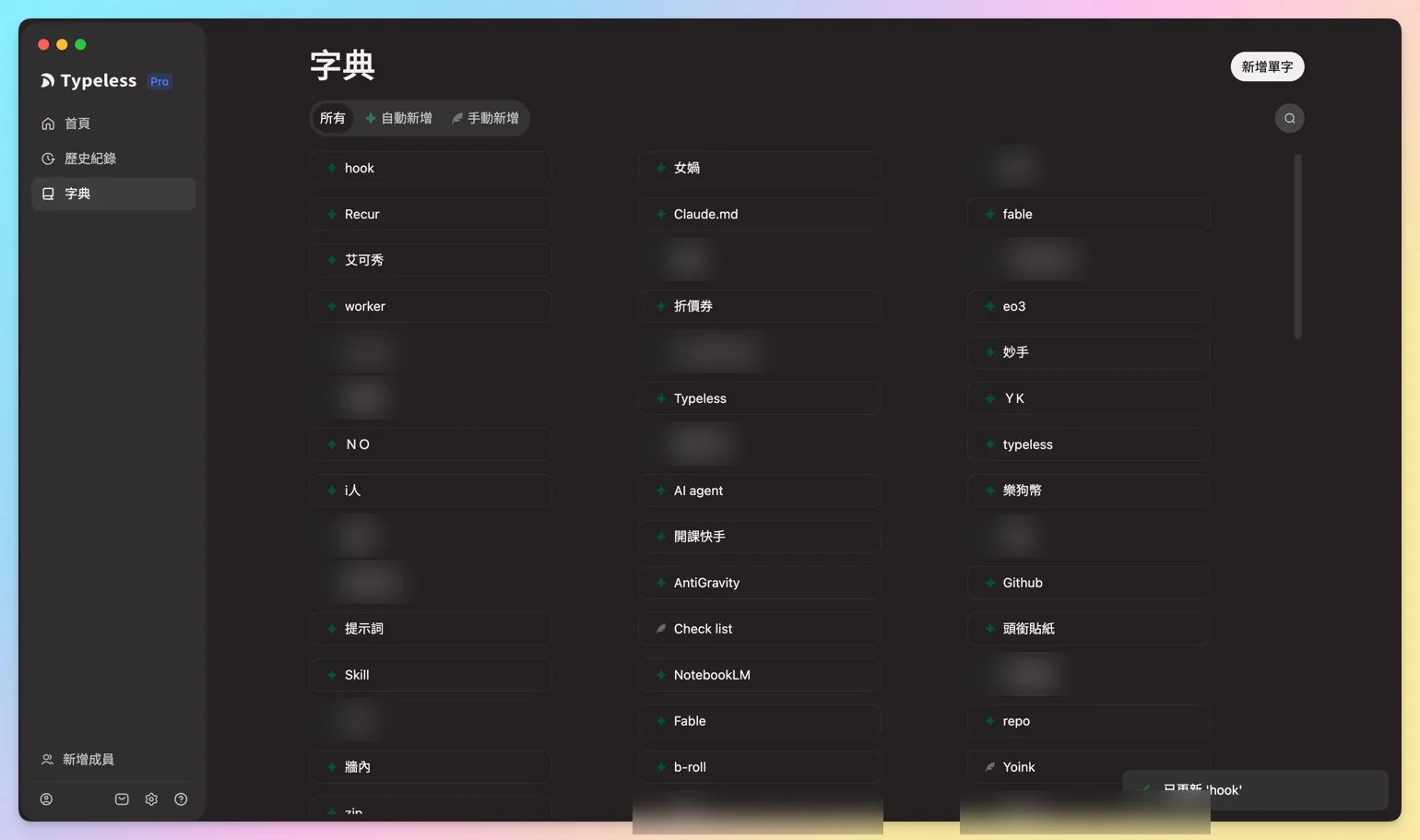
This is what I think isthe most valuable feature. Standard voice input often just guesses when it encounters proper nouns, names, or brand terms. Typeless allows you to create a personal dictionary to teach it words that only you use:
- Heptabase: Standard voice input often mishears it as the Chinese phonetic transliteration "Hei Da Bei Si." Once taught, Typeless can correctly output the English software name.
- It also understands abbreviations: I often use an App called Yoink. As long as I say "YK," it knows I mean Yoink and directly outputs the correct spelling.
- Names that are easily misrecognized: My friend's name contains the character "Yan" (with the female radical). Standard voice input often mishears it as the "Yan" in "delay." After teaching the dictionary, it no longer makes this mistake.
- Brand terms / Codenames: My own brand names like "knowledgegut" and "Ge You Suo Chang" are also included in the dictionary.
This logic is actually the same mindset as the "Second Brain" I teach: you must first teach the system to recognize your world for it to truly help you.
4. A self-learning dictionary
Going beyond a personal dictionary is its self-learning capability: if Typeless outputs a typo, I simply select the text with my mouse, correct it directly, and hit send. Typeless automatically detects that I changed the word and adds it to the dictionary on its own, eliminating the need for me to manually go to the settings page to add it. I’ve gone through 19 Chinese reviews of Typeless, and most only mention that “you can manually teach it the dictionary,” but no one has written about how it automatically evolves from correction actions.
5. One-click editing for entire passages, no need to copy-paste to GPT
Select an entire paragraph, press the hotkey, and you can directly ask it to rewrite the whole passage in a different style or make it more polite. The value of this feature lies in its “integration”: you don’t need to copy the text to ChatGPT, type a prompt, and then copy the answer back. Everything is completed within the same tool.
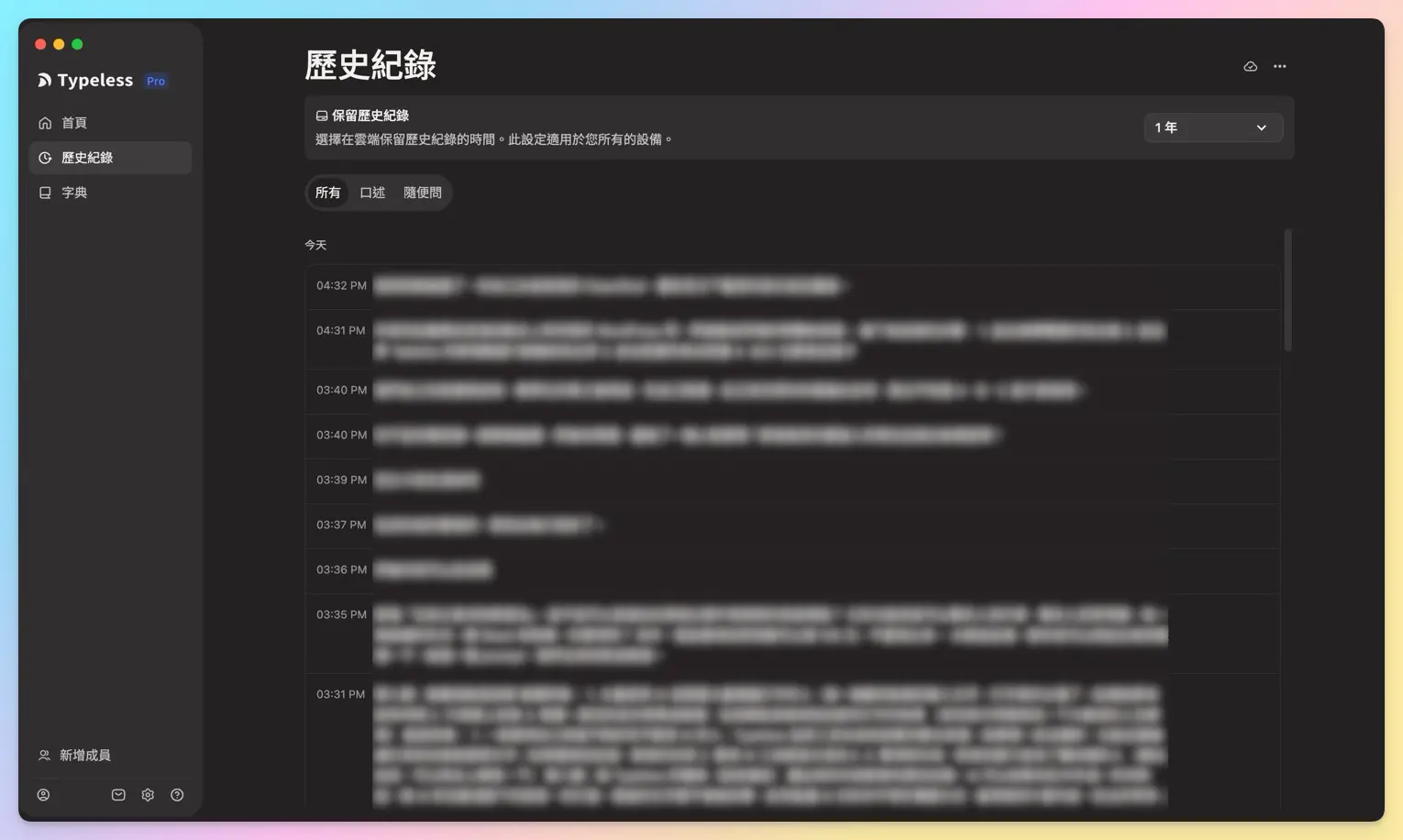
6. Half-year history records are retrievable
All spoken content is logged, allowing me to look back at voice inputs from six months ago without worrying about losing what I’ve said. This is particularly important in scenarios involving “extensive conversations with AI.” I’ll explain in detail how to use this feature in the “Second Brain” section later.
7. 100+ Languages and Translation
It supports cross-language recognition and can also translate directly, which is convenient for scenarios where you occasionally need to reply to messages in English or Simplified Chinese.
8. Privacy by Design
I originally intended to brush over this point lightly, but later felt that would be dishonest.Typeless’s voice data is indeed transmitted to the cloud for processing(the official team later acknowledged this), it is not “all running on your computer.” The official statement is that they do not use your voice to train models. For detailed terms, see Typeless Official Privacy Policy. However, it got involved in a reverse engineering controversy in early 2026. I consider this important enough to discuss separately, so scroll down to the “Typeless Security Controversy” section.
🇹🇼 Traditional Chinese and Mixed Chinese-English Real-World Test: Does It Really Hit the Mark for Taiwan Users?
This is a section that most Chinese reviews of Typeless mention, but only one truly delves into.
My hands-on conclusion: Typeless’s recognition of Traditional Chinese and mixed Chinese-English text issignificantly stronger than its competitors, which is also one of the core reasons it can enter the Taiwan market. The biggest pain point of general voice input tools is that Traditional Chinese users often encounter Simplified Chinese characters popping up mid-typing, or the recognition rate crashes when dealing with mixed Chinese-English (like the everyday way Taiwanese people speak, e.g., “Help me open a Notion page”).
Typeless handles this area relatively meticulously. Combined with the personal dictionary feature mentioned earlier, you can directly teach it brand terms and code names that only your company understands. For example, since I manage content for both the Traditional Chinese (Taiwan) and Simplified Chinese (Mainland) markets simultaneously, the personal dictionary saves me a lot of effort in post-hoc proofreading.
Honestly, One Thing That Really Pisses Me Off
It is not perfect. If I haven’t pre-taught a proper noun to the dictionary, Typeless will still output random results, and I have to rely on manual review. Here’s a real example: when I say the English word “skill,” it sometimes hears it as “schedule.” If I don’t catch this and directly feed the text to an AI, the instruction received by the AI is completely skewed, turning into helping me schedule my calendar instead of discussing skills XD. So now, when I mention easily confused words, I speak more clearly, slower, with more distinct pronunciation.
This is not a problem unique to Traditional Chinese; it is a ceiling encountered by all voice recognition tools when processing “proper nouns with similar pronunciations.” The difference lies in whether there is a way to patch this hole via a personal dictionary. Typeless is currently the most detailed in this regard on the market.
⚙️ Installation and Setup: Get Started in 4 Steps (With Real-Device Screenshots)
Installing Typeless is straightforward; the only step that might trip you up is “setting the language correctly.” I’ve broken the entire process down into 4 screenshots. Follow them, and it will go smoothly.
Download from the official website (it will automatically detect your system)
Step 1
By typeless.com On the homepage, click the download button in the center or top-right corner; it will automatically fetch the version corresponding to your computer. The official website currently lists four supported platforms: macOS, Windows, iOS, and Android. I primarily use the macOS version, so the tests and screenshots below are based on Mac.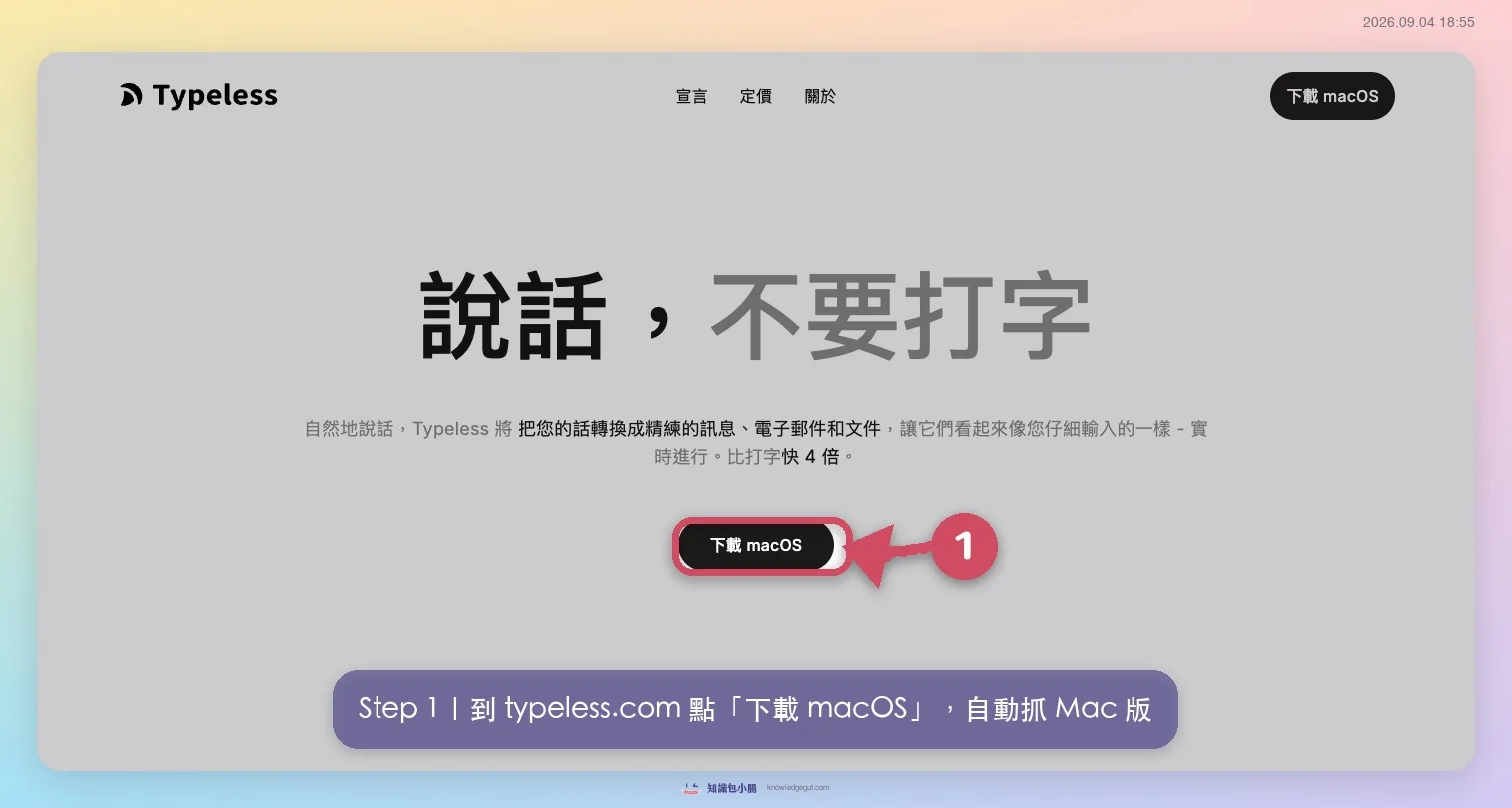
Choose a plan and create an account
Step 2
The free plan starts at 8,000 words per week, and almost all essential features are included (personal dictionary, translation, and 100+ languages). If you interact heavily with AI daily like I do, consider upgrading to Pro (approximately US$12/month with annual billing). Click "Create Account" under the Free plan to sign up.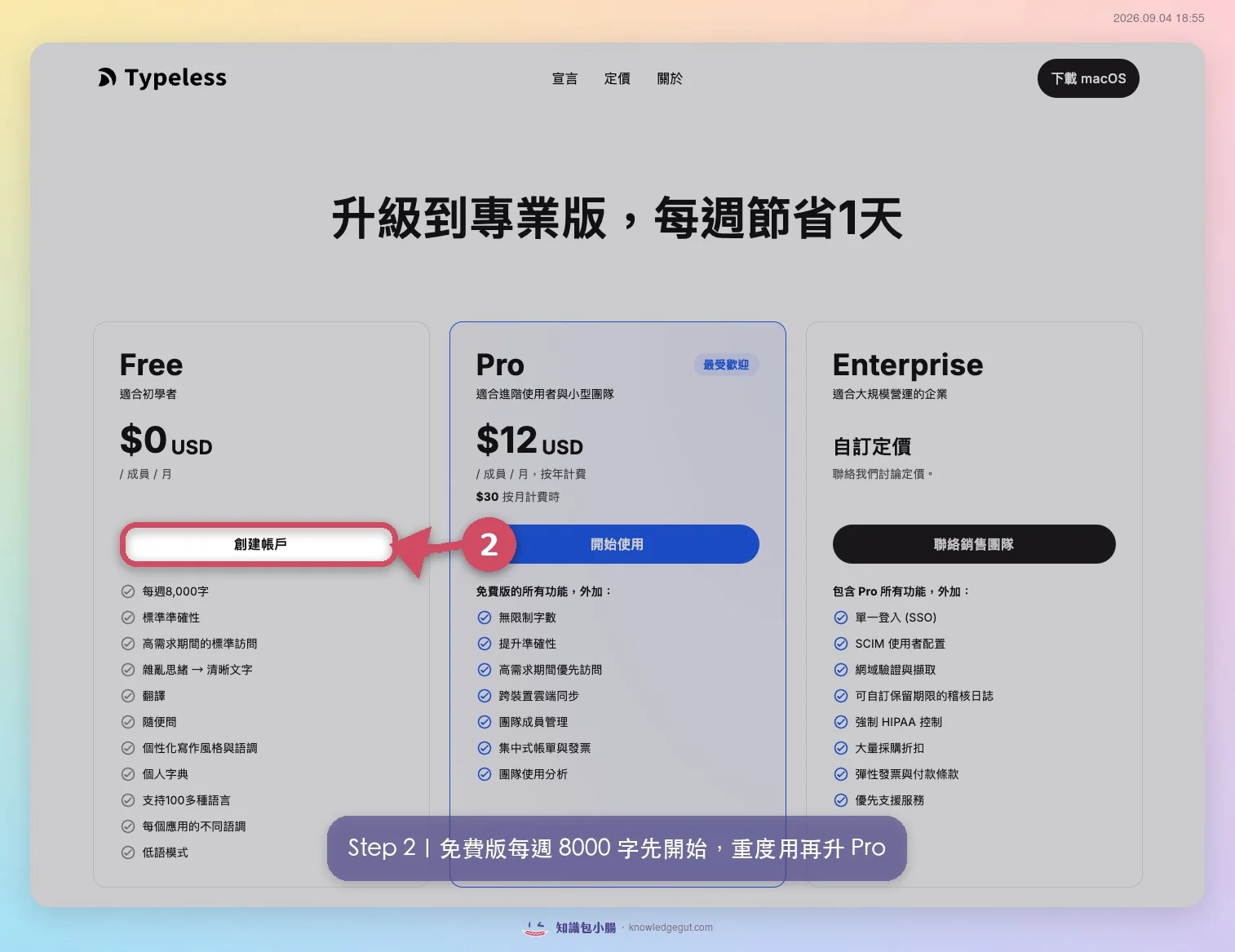
Set the interface language to "Traditional Chinese (Taiwan)" (The most critical step)
Step 3
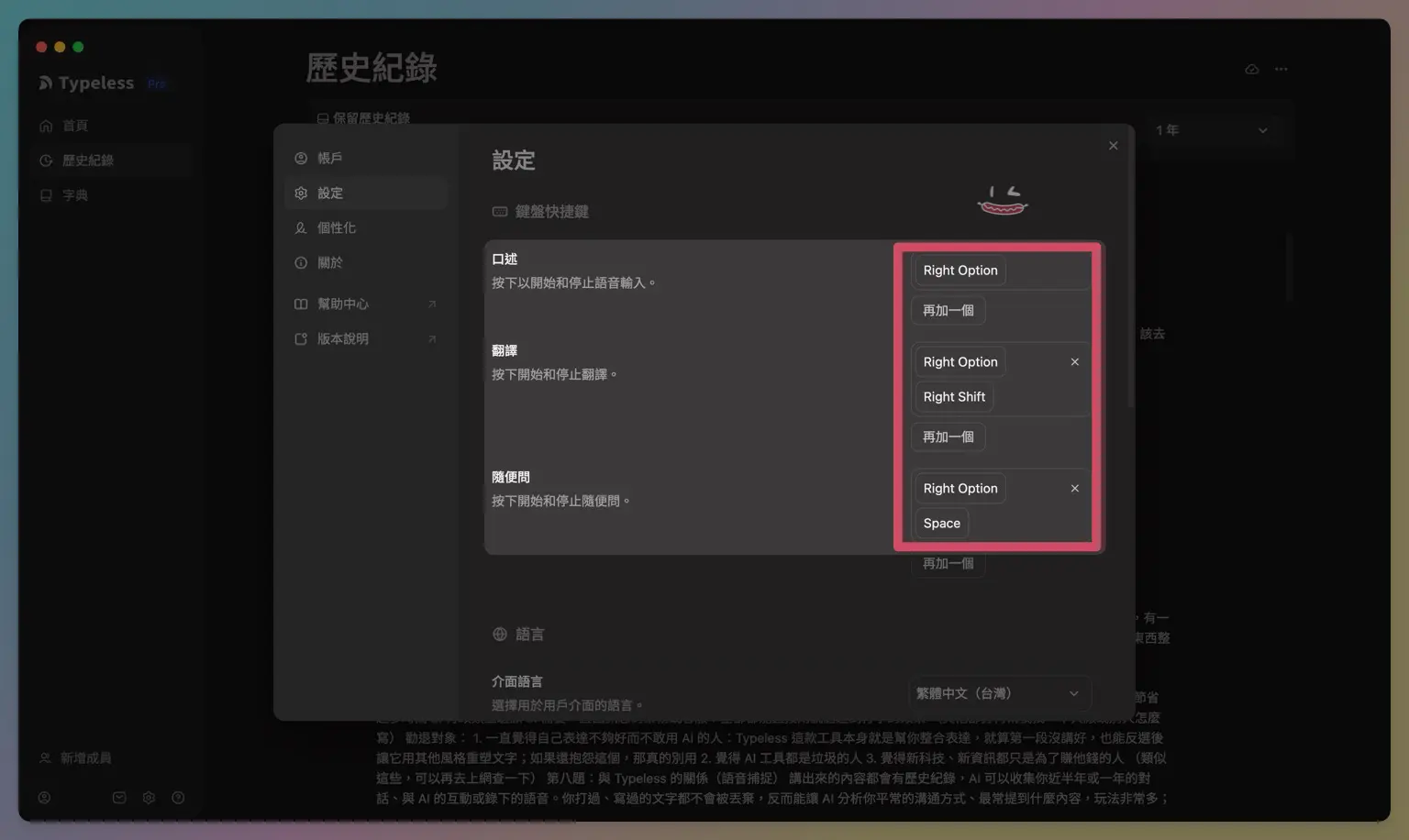
This step is where things most often go wrong. Go to the "Settings" page and first set the hotkeys for dictation/translation/general queries to keys that feel comfortable for you. Then, select "Traditional Chinese (Taiwan)" for the "Interface Language" at the bottom. If this isn't set correctly, you're likely to encounter issues where Simplified Chinese characters appear despite having set the language to Chinese.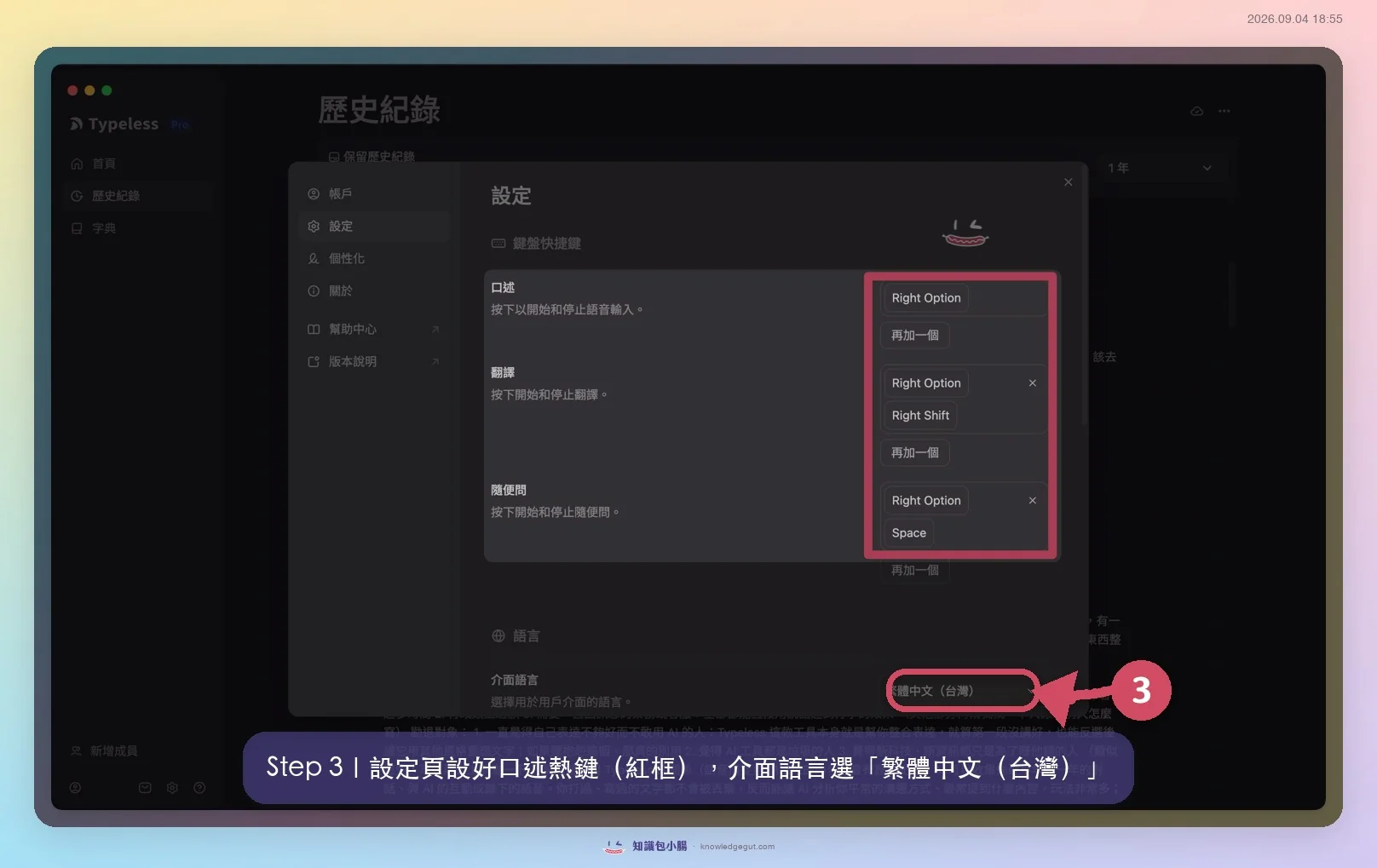
Start building your personal dictionary
Step 4
Open the "Dictionary" on the left, click "Add Word" in the top-right corner, and teach it your commonly used proper nouns, names, brand terms, and abbreviations first. It will also automatically learn from your corrections later (see "Self-Learning Dictionary" earlier), becoming more accurate with use.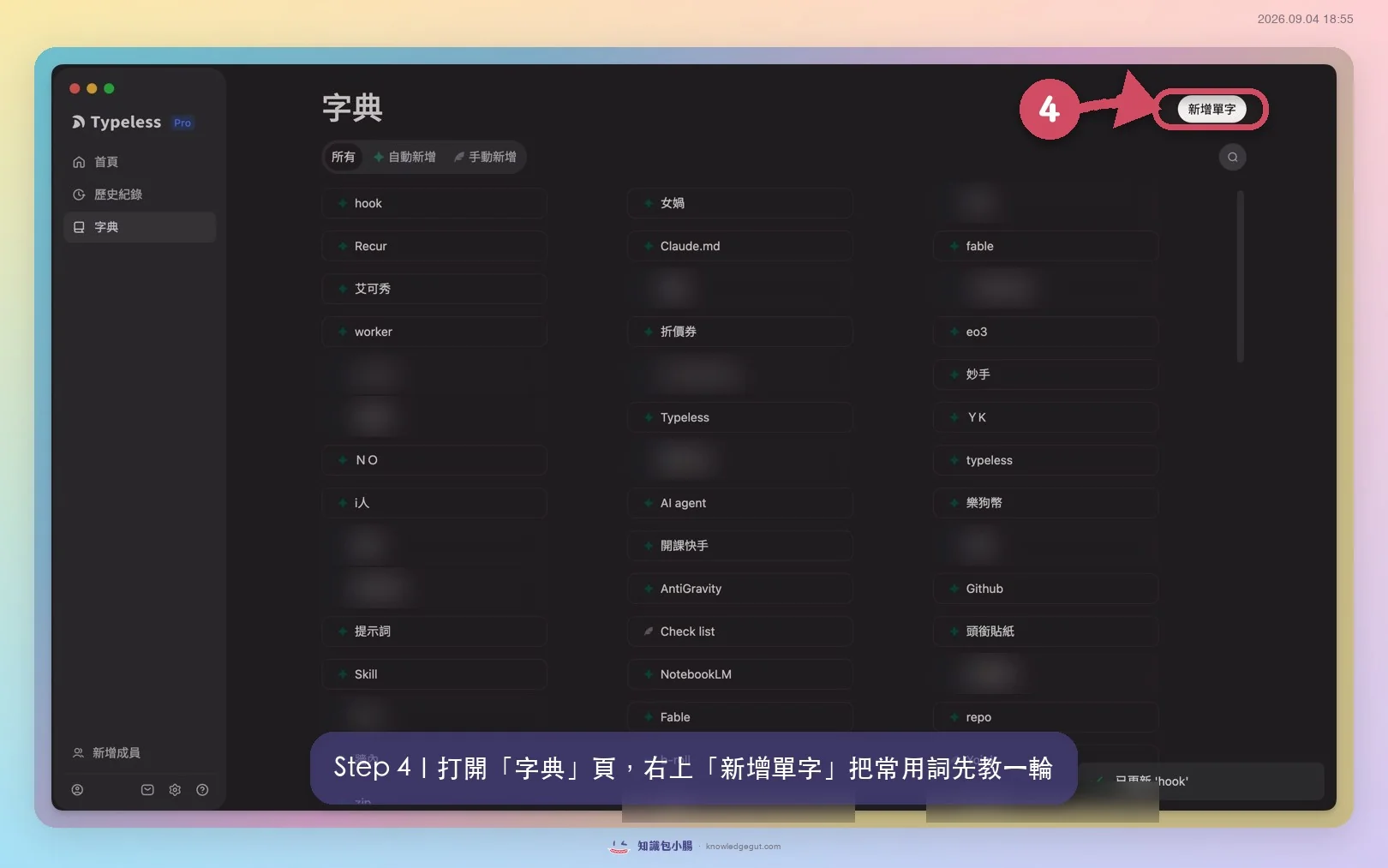
⌨️ How I Actually Use It Daily
This is what I actually do every day.
I currently act as an "AI teacher," and during work, I oftenhave 15 AI chat windows open simultaneously, using voice input for every AI conversation. I treat them like my employees, giving direct verbal commands, which is much faster than typing. I also use Typeless voice input for replying to LINE and WeChat on my phone, instead of the built-in voice input features on my phone or keyboard, because those tools don't use full-width punctuation and don't help filter out redundant words or organize content into bullet points.
When typing, my hands have to keep up with my thinking speed; when speaking, my thinking has to catch up with my mouth. The latter is always much faster.
🧠 How to Integrate Voice Input into My Second Brain System (A Unique Perspective You Won't Find Anywhere Else)
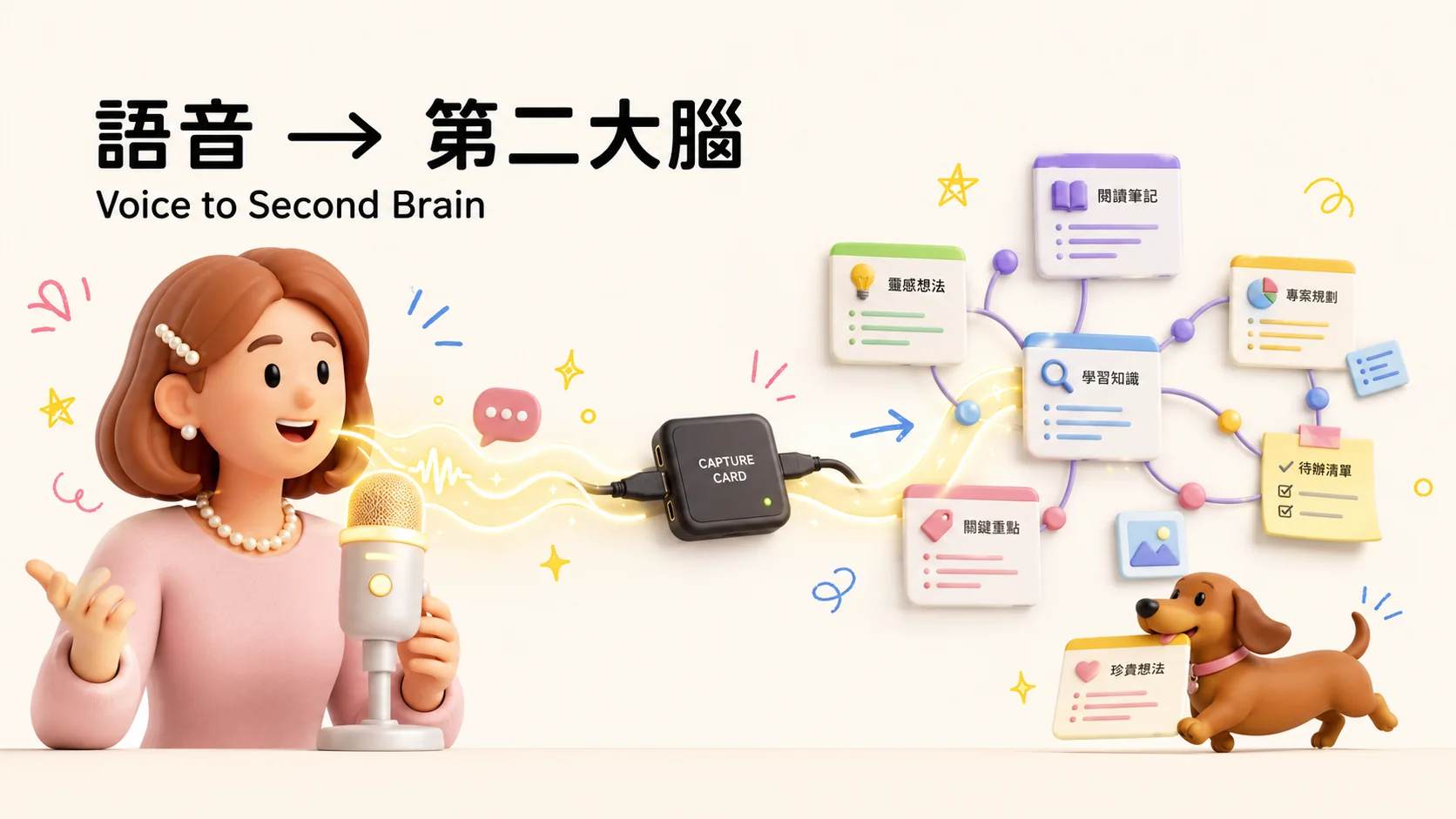
This is the part I most want to share with you: voice is just the entry point; the real value lies in how it is retrieved and re-analyzed by AI after entering your Second Brain. This is a point that none of the 19 competing articles have covered.
I went through all 19 Chinese reviews of Typeless I could find on the market, and none of them touched on this angle. To write about it, you really need to have used a complete Knowledge Management system long-term.
The core insight is this:Language is a symbol system invented by humans. Thoughts in the mind are inherently difficult to express clearly, and converting them into text is even harder. When typing, you also have to think about word order and formatting; but speaking doesn't work that way.Speaking whatever comes to mind is the fastest way to convert thoughts in your head into textual content.This is why I say Typeless is perfect for taking Notes, not just as a "typing tool".
Specifically, here is how I set it up:
- Idea Capture: The moment an idea pops into my head, I open Typeless and speak it out loud. This way, I don't have to interrupt my train of thought to figure out how to type the sentence.
- Historical Record Review: Everything I say is recorded, allowing me to look back on conversations and voice inputs from the past six months to a year. This means every word I have typed or spoken is not discarded but becomes raw material that can be analyzed.
- Ask AI to Reverse-Engineer and Distill into the Knowledge Base: I ask AI to analyze these voice recordings to identify "which content is worth distilling directly into the knowledge base," or to analyze the topics I mention most frequently and my habitual communication styles. This use case has not been covered in any review article I've seen.
- Import into Heptabase/Obsidian: The organized content eventually goes into mySecond Brain system, becoming knowledge cards that can be retrieved and connected later, rather than voice clips that disappear once spoken.
In my workflow, Typeless serves as the front-end capture stage of my Second Brain system. If you are also using any form of Knowledge Management system (Notion, Obsidian, or Heptabase all count), this stage is worth designing carefully, rather than just speaking casually and moving on. I have also written about how to use Heptabase's built-in AI to generate transcripts and summaries for free, which fits perfectly with this workflow.
⚖️ Pros and Cons: An Honest Breakdown
| ✅ Pros | ❌ Cons |
|---|---|
| Recognition of Traditional Chinese and mixed Chinese-English text is significantly better than standard voice input. | Proper nouns are still guessed incorrectly if not pre-taught to the dictionary (e.g., skill → schedule). |
| The personal dictionary willself-learn., automatically adds corrected words to the dictionary | Recognition accuracy drops in noisy environments |
| Automatically adjusts tone based on the App, no manual rewriting needed | When content is over-edited, it may occasionally deviate from the specific details you originally intended |
| Edit entire paragraphs with one click, no need to copy-paste back and forth with GPT | Cross-system experience may vary slightly; refer to the latest information on the official website |
| Six months of history can be retrieved | The free tier is clearly insufficient for heavy users (e.g., those who have extensive conversations with AI) |
| 100+ languages and real-time translation | Not suitable for scenarios requiring a verbatim transcript (see below) |
🔒 Typeless Security Controversy: My Take as a Paid User
When discussing this tool, we cannot just report the good news. In February 2026, a Japanese engineer (X: @medmuspg) reverse-engineered Typeless v1.0.0 and released a series of accusations. This was also reported by Taiwan's Ada (Computer King), Hard to Learn, and CMoney.
What is the controversy?
His accusations roughly include these points: The official claim at the time was "on-device processing," but his tests found that audio was compressed into Opus format and transmitted via WebSocket to AWS servers in Ohio, USA; the App records the URLs you are currently viewing (capturing full URLs for Gmail and Google Docs) and monitors which App windows are open; it uses CGEventTap to monitor system-level keyboard input, which is technically hard to distinguish from a "keylogger"; the local typeless.db also usesplaintextto store voice results and URL records. Combined with his belief that the company lacks transparency, the whole incident blew up.
What does the official stance say?
The official team responded, stating that the accusations regarding camera, Bluetooth, screen recording, screenshots, and keylogging were "all false": it only requires microphone and accessibility permissions, and the so-called keylogging is actually local shortcut key detection with no data upload. However, one point the official teamadmitted:is that voice is indeed processed in the cloud, which they described as a "trade-off between privacy and functionality."
You have seen both sides' statements; I do not take sides. I have affiliate links and am also a paid user, so I should be even more transparent.
My recommendations
- Do not use cloud voice for highly sensitive content: For sensitive data like account credentials, customer PII, medical records, or legal documents, I do not recommend any tool that uploads to the cloud, and Typeless is no exception.
- If you are very concerned about privacy, switch to local solutions.: macOS built-in voice input, Whisper.cpp, and MLX Whisper are all options that run on your own computer, ensuring your data never leaves your device. The trade-off is that their semantic organization is not as smooth as Typeless.
- Want to keep using it but reduce the risk?: Turn it off before discussing sensitive content, or disconnect from the internet first. Don’t leave it running in a window where it might process confidential information.
I am aware of this controversy and have read both sides of the argument, yet I continue to use it. The reason is simple: I only use it for content that is intended to be public, such as article drafts, conversations with AI, and social media replies. The risk is low whether or not it goes to the cloud. However, Iwould neveruse it to dictate account credentials, student PII, or unpublished business secrets. I draw that line very clearly for myself. Please also draw your own line based on your personal boundaries regarding whether to use it and for what purposes.
🆚 Typeless vs. Wispr Flow vs. VoiceInk: Cost and Positioning Comparison
Typeless is most often compared with Wispr Flow Here is a clear breakdown of the pricing and positioning:
| Tool | Free Tier | Pro Pricing | Positioning |
|---|---|---|---|
| Typeless | 8,000 words/week | $12/month (annual billing) or $30/month | Best-in-class recognition for Traditional Chinese and mixed Chinese-English text, with natural tone |
| Wispr Flow | 2,000 words/week | $12-15/month | Strong cross-platform keyboard positioning, with solid security and enterprise deployment, but weaker at recognizing Chinese variant characters (such as 吃 vs 喫, or 的 vs 得) |
| VoiceInk | Open source and self-hostable | Approx. $50/year | Local processing and privacy-first, but overall semantic handling is less smooth than the previous two |
My honest comparison insights: After trying several alternatives, I feel the biggest difference is that Typeless has an AI brain that truly "understands" what you're saying. Some alternatives struggle with smooth semantic organization when helping me, and sometimes even misinterpret my meaning. Three things Typeless does better:Tone adjustment(It automatically softens overly direct statements to be more polite),One-click paragraph editing、High integration(No need to switch apps to copy and paste).
But if you prioritize security, enterprise adoption, and cross-platform usage, I would honestly recommend checking out Wispr Flow: it is indeed stronger in these areas than Typeless. This isn't me discounting Typeless; it's a realistic trade-off based on actual usage scenarios.
💰 Should You Upgrade Your Plan? I’ll Break Down the Math Using My Real-World Data
The free plan's quota of 8,000 characters per week, for someone like me who has extensive AI conversations daily, is roughly used up in 3 days. This was the key reason I decided to pay for a full-year subscription: after paying, I can use it unlimitedly and access voice input records from six months ago, so I don't have to worry about losing previously spoken content.
Let me calculate the cost based on my own real-world data:
- I have accumulated dictation 618,000 words, it took 100 hours。
- For the same word count, typing would take approximately 385 hours(calculated at an average Chinese typing speed of 30-40 characters per minute).
- This is equivalent to saving 285 hours。
If we apply the logic of affiliate marketing or content creation: these 285 hours could be directly converted into revenue—writing more articles, onboarding more students, or even taking on another coaching session. This is a more practical decision framework for knowledge workers than simply saying it "saves time."
If you're still hesitating, try the free version for a week. If you use up the 8,000 words in three days like I did, then don't overthink it XD
🎯 Who Is This For? Who Should Pass?
Recommended for these types of users
- Heavy AI users and frequent typists: You can input text quickly with a single hotkey, saving a significant amount of time.
- Administrative office workers: Those whose daily work involves extensive document processing.
- Sales or customer support staff who need to reply to messages constantly: Speaking achieves the same effect as typing, significantly boosting response speed.
- Content creators, consultants, and remote workers: Ideal for situations where you know exactly what you want to express but are too lazy to type it out slowly.
- People who need to record on-site interviews: Voice is directly converted into organized text, saving a large amount of post-processing time.
Who Should Avoid This
- People who feel their expression is inadequate and are hesitant to use AI: Typeless is itself a tool that helps integrate and refine your expression. Even if your first draft isn't perfect, you can select the text and ask it to reorganize it in a different style. If you are still hesitating about this, this tool might not be suitable for you.
- People who think all AI tools are garbage、People who believe new technology is only designed to make money off you: This mindset will prevent you from using any tool effectively; it is not just a problem with Typeless.
- People who need verbatim transcripts, meeting minutes, or legal or medical records: Typeless automatically organizes, removes filler words, and restructures sentences, so the output is not a verbatim transcript. If your requirement is a record that is "not missing a single word," this tool is not suitable for you; you should look for another one. Many reviews have not made this point clear.
❓ Typeless FAQ
Q1: Does Typeless support Windows or Android? Yes, it is supported. The official website lists four platforms: macOS, Windows, iOS, and Android. I primarily use the macOS version, so the tests and screenshots in this article are based on Mac; for detailed features on other systems, please refer to the latest information on the official website.
Q2: Is the free version sufficient? The free version offers 8,000 words per week, which is suitable for light users. If you, like me, have extensive conversations with AI daily, you will likely use up the quota in about 3 days and need to upgrade to Pro.
Q3: Compared to Wispr Flow, which is more suitable for users in Taiwan? If you care about the accuracy of recognizing Traditional Chinese and mixed Chinese-English text, Typeless currently handles this in more detail. If you prioritize information security, enterprise deployment, and cross-platform compatibility, Wispr Flow is the more suitable choice.
Q4: Can I use voice input directly in WordPress or blog editors? Yes, Typeless is a system-level voice input tool. In theory, it supports all fields where you can type, including text editors within browsers.
Q5: Does setting up a personal dictionary take a lot of time? Basic setup is quick, but the dictionary is something you cultivate over time. Since it automatically detects your corrections and learns from them, it becomes more accurate the longer you use it. You don't need to set it up perfectly all at once.
Q6: Will Typeless over-edit my content and distort the meaning? Occasionally, yes. This is also why I recommend not using it in scenarios that require verbatim transcripts: its design purpose is to help you organize, not to preserve your original words.
🌭 Conclusion: How This Changed My Second Brain Workflow
Typeless is the front-end entry point of my entire Second Brain system. The moment an idea pops into my head, it directly becomes text that can be processed by the system, analyzed by AI, and eventually settled into knowledge cards, without the step of "typing" that slows down my thought process.
If you are also building your own Knowledge Management system, the section on "connecting voice input to your Second Brain" in this article is the part I think is most worth your time to digest.
If you want to give it a try, you can download it via my link. The free version offers 8,000 words per week, so just play around with it first~
✦ Second Brain | Heptabase Complete Tutorial: 45 Practical Heptabase Tips 10 Practical Use Cases for Heptabase Use Heptabase's Built-in AI to Generate Transcripts and Summaries for Free
🧠 Want to truly integrate voice input into your Second Brain?
A good tool doesn't mean your system can handle it. Every week, I write about tools I've tested and how to integrate them into your Second Brain in the Gut Talk Newsletter!
✦ One email per week: Tool reviews × Knowledge Management implementation workflows ✦ Monthly [Gut Talk] online talks by non-experts, subscribers get priority registration ✦ Get notified the moment new free tutorials go live
If you don't want to slowly figure it out on your own and want someone to guide you through building your entire Second Brain (which is what I do), you cancheck out my Knowledge Management Coaching Course。
🌭 Welcome to the Gut Community 🌭

If this post was helpful, feel free to save it to your own Second Brain. I will continue sharing real-world tests on "Tools × Knowledge Management" for you. See you in the next post.

Xiaochang🌭 (Yang Ting-ya / Phoebe Yang)
AI Second Brain Application Specialist
Turn knowledge into assets and let experience compound—
Train your First Brain, build your Second Brain (Heptabase), and master your AI Third Brain.
Specializing in Zettelkasten Notes, self-created memory-technique Notes, AI Automation, and AI Agent Systems.
Has coached 2,000+ professionals in building personal knowledge bases.
📩 Gut Talk Newsletter · IG @knowledgegut · Threads @knowledgegut

If you have any questions about the article content, or if there are any parts you'd like me to elaborate on, feel free to leave a comment below and let me know~
Some links in the article are "Affiliate Marketing" links. If you click through and make a purchase, Xiaochang receives a tiny little bit of commission (it won't affect the price).

by Knowledge Management Mentor Xiaochang🌭
 English
 繁體中文
繁體中文 日本語
日本語