


✍️ 本文更新時間:2026 年 May 13 日
Preface
Heptabase 是一款以白板與卡片為核心的數位筆記軟體,2024 年底內建 AI 功能後,可以直接上傳 Podcast 音檔(mp3 / m4a / wav),由 AI 自動生成完整逐字稿與摘要重點,無需另外付費購買轉錄工具。這篇文章用 8 個步驟教你完整操作流程,並整理 11 個常被問到的問題。
Update Log
• 2026/05/13
文章開頭補上「Heptabase 是什麼」的平台介紹段落,讓還沒用過的讀者也能快速進入狀況
New Heptabase Feature Launched! Use built-in AI to generate Podcast transcripts and summaries, with YouTube support coming soon
If you still don't know what
is, you can first check my article Heptabase 【Heptabase】10 Must-Learn Uses!in this article, and also claim thethis article, and go claim what I created,Free Resources, to help you quickly understand the useful limits of what Heptabase can achieve.
For each section heading in this article, I've answered based on 'questions you might want to ask.' I recommend you check the table of contents and jump directly to the answer sections you're interested in.

Let's get started ~ !
8 Steps to Convert Your Favorite Podcast Knowledge into Transcripts and AI Summary Highlights
From now on, if you want to extract knowledge points from Podcasts and create notes, you no longer need to open multiple software or go through so many tedious steps:
- Download Podcast audio files using software A
- Upload to software B, which automatically generates transcripts
- Then feed the transcripts into AI and ask it to create a summary
- When you find a summary you like, you still have to manually find the corresponding timestamp in the episode to listen
- Finally, you have to manually input your favorite knowledge points into note-taking software
All the above steps can be completed within Heptabase! Continue reading and I'll teach you exactly how to do it.
Feature Analysis: Using Heptabase as a Podcast Listening Platform
🎁 Thank you for reading this far! I've prepared free resources for you ⬇

I'm giving you the 《Heptabase 13 Application Scenarios Inspiration Pack: Break Your Imagination!》 worth over $899~
《7-Day Heptabase Workshop! Build Your Knowledge Management System from Scratch》
This is a free online course I spent an entire month creating. Simply complete the 7-day workshop and follow the steps to finish assignments, and you'll completely transform your note-taking method and build your own Second Brain!
I'll guide you hand-in-hand (videos + text) to complete daily tasks:
- ✅ Day 1 Navigation Map
- ✅ Day 2 Dream Board
- ✅ Day 3 Inspiration Pack
- ✅ Day 4 Gratitude Journal
- ✅ Day 5 Organization Chart
- ✅ Day 6 Reading Notes
- ✅ Day 7 AI Summary
Step 1
Click the + plus button on the left sidebar and select Podcast
Step 2
Find the channel and episode you want to listen to and click Search Start searching
Below are instructions on how to precisely search for the episode you want. First finish these eight steps, then scroll down to see more
Step 3
Click Add to card library to turn the episode you want to listen to into a card
Step 4
Card LibraryPodcast audio card appears
This 'Not Working Next Year' channel is created by my good friend Eden who founded it. Inside you'll find shares about entrepreneurship, short videos, Podcasts, and all kinds of great entrepreneurial thinking. He recently launched UBO Mentorship Program, which provides comprehensive life mentoring. It's awesome—you should definitely check it out and join his community. And if you ever make it big, remember to say KnowledgeGut introduced you! 🤩
Step 5
Clickdouble arrow, expand this Podcast audio card
Step 6
Click the Transcript Generate Transcript
Step 7
Open the right panel and click theLight Bulb (Insight)
Step 8
Select the language you want to generate and click Generate Insight Create Insight
Congratulations! 🎉 You've successfully generated the transcript and summary of your favorite Podcast!
There are two search boxes—the lower one lets you find content in the vast sea of Podcast text
The upper one is for directly searching channel names

This is Podcast content from the 'Life, Ah' channel that invited me to share.Feel free to listenHahaha~
If you want to find a specific episode within a channel that you want to listen to

Different sorting methods make it convenient to find episodes
To find the exact episode, remember to search for the channel first, then use keywords to pinpoint the right content.

Adjust playback speed

Can I upload my own recorded audio files to generate transcripts and summaries?

About Built-in AI Summaries and Insights
A friend asked me this question. I initially said it wasn't possible, but after testing it really does work! WOW 🎉🎉
I always thought you could only generate transcripts and summaries for content found through + > Podcast search using the steps I taught. But it turns out you can do the same with self-uploaded audio files > converted to audio cards!
Let me show you how to use a free online recording service to test this feature!
Step 1
Click Online Voice Recorder Record any 10-second audio file
✦ For those with time on your hands, feel free to listen to the test recording I made... confession poetry 🤣 (so embarrassing)
Step 2
Drag the recorded audio file directly into the whiteboard
Step 3
Click the three dots and turn the audio file into an audio card
Step 4
Select 'Show Transcript' to display the transcript and generate a summary
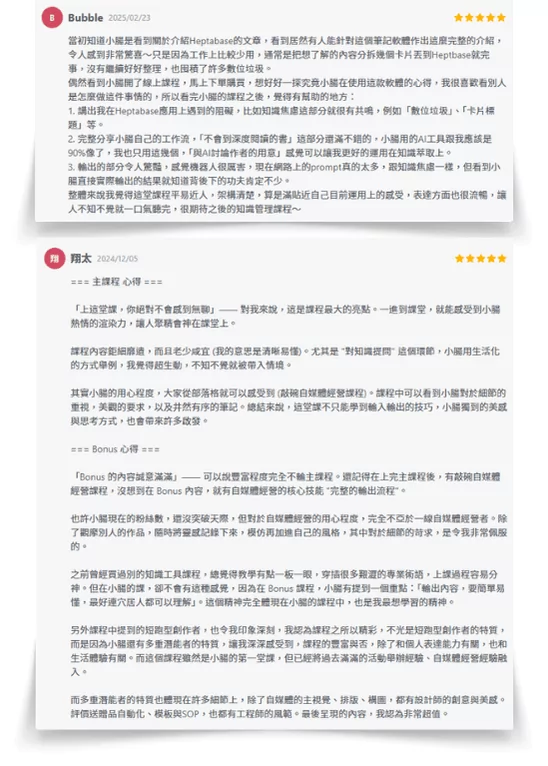
My friend said that because of this feature, he cancelled other software services and officially became a Heptabase user + bought courses to become my student haha.

Over 215 students have enrolled, leaving glowing 5-star reviews! The bonuses alone exceed the course value, plus I share exclusive Creator SOP workflows—original content you won't find anywhere else!!
How effective are the summarized key points?
After clicking the summary, does it automatically sync to the timeline?

I personally think it's at a 'convenient' and 'usable' level right now. When testing, I recorded three short fragments without any contextual logic, and the Insight AI was able to help me summarize these three short segments into a complete knowledge concept.
The advantage is that it can quickly provide you with a version to help with your thinking and learning. The disadvantage is that it may still misinterpret what the channel host wants to share.
Data accuracy is a common problem with all AI tools right now, and you can freely decide whether to use this feature.
How do I turn a summary into a card note?
Yes! Click on the summary information, and it will directly show which parts of the transcript this summary was extracted from. This feature is super convenient!!!
Step 1
Click 'Locate' in the top right of the summary or 'Locate Source Block' in the three-dot menu for the same effect或者三點內-Lacate-soruce-block-是一樣效果.webp)
Step 2
The left sidebar will show which Podcast segment your selected summary references
Can I listen to Podcasts directly online in Heptabase? Use it as a free platform
You need to understand first that the summarized content can be thought of as 'a card not yet in the card library.' You need to perform a few more steps to add the summary to your Heptabase whiteboard.
Step 1
Click the three dots in the top right of the summary and select 'Turn into new card'
Step 2
Go to the Card Library to confirm the newly generated card確認生成的新卡片.webp)
You'll notice that this card's title = the AI-summarized text, and the card's content is all the transcripts from the Podcast segment the summary referenced!
Step 3
Open the card library in the right sidebar of the whiteboard and drag the card into the whiteboard
The card generated this way extracts two key pieces of information at once, making it convenient for us to transform the text into whatever style we like 💛 I really love this feature! Thank you, Heptabase, and I always support this YC-backed Taiwanese team.
Podcast shows are all found by searching, not by uploading files into Heptabase, right?
Yes! I actually rarely listen to Podcasts; I mostly use the Fan Shu app. But now that Heptabase has this feature, I will definitely start discovering knowledge from a wide range of Podcast channels.
After all, this workflow is incredibly smooth. I don't have to adapt to various Podcast apps, and I can directly record and integrate into my whiteboard as part of my smart notes.
Because of this feature, I'm even considering entering the Podcast space!
Can I find Podcast content from Apple, Android, Spotify, in Chinese and English?
That's right! You can search for Podcast shows directly in Heptabase without uploading files yourself. It basically functions as a Podcast platform! XD
Is there a difference between Podcast cards and audio cards?
As long as your channel name and keywords are correct, you can find Podcast show data in any language, whether Chinese, English, or uploaded to any platform!
How do I download Podcast transcripts generated within Heptabase?
You can simply think of a Podcast card as an audio card. Regular audio files added to Heptabase are cards with sound but no image, while Podcast cards have both sound and channel artwork.

| Sound | Image | |
|---|---|---|
| Regular Audio Card | ✅ | ❌ |
| Podcast Card | ✅ | ✅ (Channel artwork) |
To learn in detail about 7 different card types, you can refer to my comprehensive tutorial article on #01 The Seven Forms of Cards。
Can I translate foreign Podcast transcripts into Chinese? Using Acquired as an example
From my testing, there's currently no way to download transcripts generated from Podcast cards. However, there's a very simple alternative: just select all + copy and paste it anywhere that supports text, such as LINE.
But this has a downside: the pasted transcripts will show time stamps. If you really don't want to see the time information, just paste it into GPT and ask AI to remove the time stamps for you. Very convenient.
If you don't understand, ask me again. You can subscribe to myGut Talk Newsletter + send me an email to ask.
Can the web version of Heptabase also generate Podcast transcripts and summaries?
Oh no, it's not supported yet. Right now, only the native language of the Podcast audio source is supported. This means English channels can only generate English transcripts and cannot be directly converted to Chinese. However, summaries can be translated to Chinese without any problem!

My friend is a brilliant venture capitalist. He says he normally listens to the Acquired podcast, and each episode is at least 2 hours long with extremely dense content. One Meta episode went for 6 hours... it really makes you question life.
And every time, it takes a lot of time to download the Podcast content, and then having to send the audio to AI for translation is very tedious.
But after I shared this with him, he felt that having summaries in Traditional Chinese alone was worth subscribing to Heptabase. He even made a bold assessment (see image below)...!

That's my hope. I really, really love Heptabase~
Does listening to Podcasts this way cost money? Are there any additional charges or usage limits?
Yes! The functionality is identical to the desktop version, and the interface is in the same locations. However, if you use the web page translation feature to temporarily change the interface to Chinese, the summary feature may temporarily stop working. Therefore, I recommend using the desktop version for convenience.
What is the Heptabase subscription price? Can I use it for free?
Currently, the Podcast listening feature in Heptabase is included in the subscription fee, so there's no extra charge~ except!
Currently, this feature is in beta testing. Within one month, you can only convert up to 5 hours of total audio length into transcripts.

Alan replied: 'This quota is meant to allow everyone to try it for free. In the future official version, this feature will likely be provided through one or more methods such as API Key/Extra Credit or Premium Subscription.'
So if you want to use this feature long-term in the future, you may need to subscribe to Heptabase's premium plan to get unlimited usage. I'm also continuously tracking this, and I'll update the article when there's news.
Heptabase is currently paid software

Are there any promo codes or discount codes?
- Monthly plan: $11.99 USD/month
- Annual plan: $8.99 USD/month
Monthly cost: $11.99 USD (approximately 390 NTD per month)
Annual cost: Total is $8.99 USD × 12 months = $107.88 USD (approximately 3,300 NTD per year)
Which plan is more suitable for me?
No discount codes unfortunately. However, all accounts can use it free for 7 days. If you're very interested in this note-taking software and want to try it out, you can click the button below to try Heptabase. This would also be like buying Xiaochang a latte, giving Xiaochang more motivation to create and write content. Thank you for reading.
On 2024/12/09, when I saw this update, my jaw dropped @@. After trying so many Podcast transcript collection software, I didn't expect Heptabase to come up with this feature!
◽ If you just want to try it out, please select the 'Monthly Plan'
Heptabase provides new users with a 7-day free trial period. After the trial period, the monthly subscription fee will be charged.
◽ If you decide to subscribe long-term, please select the 'Annual Plan' (Xiaochang recommends 🌭)
The reason I recommend it is simple: using a notes app for just 1 month is barely enough to feel its power. I jumped in in 2023/09 and bought a year subscription right away. After three months of using it, I became a passionate fan and partner promoter, and that's when I started what you all know as the 'KnowledgeGut' blog.
And the course experience sharing came from that too. It all happened because I subscribed to the annual plan, which changed my life trajectory 😜
🌭 Welcome to the Gut Community 🌭

Thank you for reading my article. This is a tech news piece, and I'm still thinking about what article outline and structure would be better for you to read and get started. Feel free to leave a comment and share your thoughts. I'm Xiaochang, remember to subscribe to my Gut Talk Newsletter and I'll send you something nice ~

小腸🌭(楊婷雅 / Phoebe Yang)
AI 第二大腦應用師
把知識變資產,讓經驗可複利——
鍛鍊第一大腦、打造第二大腦(Heptabase)、駕馭 AI 第三大腦。
專精卡片盒筆記法、自創記憶術筆記法、AI 自動化、AI 智能體系統。
已陪 2,000+ 位專業人士搭建個人知識庫。
📩「腸篇大論」電子報 · IG @knowledgegut · Threads @knowledgegut

If you have any questions about the article content, or if there are any parts you'd like me to elaborate on, feel free to leave a comment below and let me know~
Some links in the article are "Affiliate Marketing" links. If you click through and make a purchase, Xiaochang receives a tiny little bit of commission (it won't affect the price).

by Knowledge Management Mentor Xiaochang🌭


 English
  繁體中文
繁體中文 
Thank you for sharing!
You're welcome ~ thanks for the comment :))